Documentation Mercado Libre
Check out all the necessary information about APIs Mercado Libre.
Documentation
Price per variation
The Price per Variation initiative aims to provide sellers with the ability to offer different selling conditions for the variations of the same product, allowing them to apply their sales strategies in a more flexible and scalable way.
Seller Activation
Seller activation for the new User Products model will be carried out gradually. During this process, two types of sellers will coexist: those who have not yet migrated and must continue using the previous model, and those who have already been activated for the new model. Sellers operating under the new system will be able to publish products with different selling conditions for their variations.
Activated sellers will have the tag "user_product_seller" which you can identify by calling the users API.
Request:
curl -X GET -H 'Authorization: Bearer $ACCESS_TOKEN' https://api.mercadolibre.com/users/{User_id}
Response:
{
    "id": 206946886,
    "nickname": "TETE6838590",
    "registration_date": "2016-02-24T15:18:42.000-04:00",
    "first_name": "Pedro",
    "last_name": "Picapiedras",
    .
    .
    .
    "tags": [
        "normal",
        "test_user",
        "user_info_verified",
        "user_product_seller"
    ]
}
Post-activation considerations:
The process of activating a seller for the new model consists of enabling the user_product_seller tag and subsequently performing a "sweep" of items without variations, to which a family_name will be assigned, adopting the new User Products structure.
Item Structure
Once sellers are activated for the new model, the structure for publishing an item changes. Therefore, if the necessary adaptations are not made within the application, publishing with the previous model will not be possible as a 400 error will be returned.
The following table shows what changes in the item structure in the new model:
| Item entity structure | Legacy Model | New UP model |
|---|---|---|
| title | The seller provides the attribute | Automatically created by Meli after the POST to items |
| family_name | N/A | New attribute that is a generic description of the item, covering the different User Products of the same family. It is recommended to use generic and representative text for the items. |
| array variations | Contained the detail of each variation | This array no longer exists |
| user_product_id | N/A | Automatically created by MELi after the POST to items. When MELi detects that the item being published corresponds to a previously created user_product_id, it will associate it with this UP. If it considers it to be a non-existing UP, it will generate a new user_product_id. |
With the change in item structure, and considering that once User Products is activated for the seller, they will have items in both the previous and new models, it is crucial to adjust the current integration experience. This will ensure that, when querying the seller's items, both models coexist without issues.
We recommend including the following features for items in the new User Products model within the application:
- Group items by User Product.
- Group User Products by family.
- Display the family_name and user_product_id of each item.
- Restrict editing of the item title.
- Allow editing of the item's family_name.
- When querying a User Product, display the details of its variations.
- Allow setting different selling conditions for each variation.
These improvements aim to optimize the user experience and facilitate item management under the new system.
Attribute Logic for Family and User Products
The attributes that can vary between the variants of a User Product are defined by Mercado Libre through the so-called child PKs, and depend on the category or domain in which the product is published. It is essential that all variants have these variation-enabling attributes consistently filled in; otherwise, products may become ungrouped outside the same family. Additionally, it is possible to assign specific attributes to each variant, using any attribute that is not a PK (neither parent nor child), which allows greater information flexibility between variants. The list of supported attributes for each category and domain can be consulted through the endpoints in this documentation.
Publish an item
Below are some considerations you should keep in mind when publishing an item under the new UP model.
The new family_name field is a required field that the seller must complete. This field will be a generic description of the item, covering the different User Products of the same family. It is recommended to use generic and representative text for the items, for example:
Family name: "Apple iPhone 256GB"
Item_1: "Apple iPhone 256GB Red"
Item_2: "Apple iPhone 256GB Blue"
Additionally, the title field must not be sent by the seller as Mercado Libre will complete it automatically with the information of the specific item or product. This is done with the objective of having more standardized items, based on the domain, attributes, family_name, among others.
As an example, we will be publishing two items from the same family, sharing: family_name, domain, condition, seller_id and GTIN.
First item, in blue:
curl -X POST https://api.mercadolibre.com/items -H 'Content-Type: application/json' -H 'Authorization: Bearer $ACCESS_TOKEN' -d '{
   "family_name": "Apple iPhone 256GB",
   "category_id": "MLM1055",
   "price": 17616,
   "currency_id": "MXN",
   "available_quantity": 6,
   "sale_terms": [
       {
           "id": "WARRANTY_TIME",
           "value_name": "3 months"
       },
       {
           "id": "WARRANTY_TYPE",
           "value_name": "Seller warranty"
       }
   ],
   "buying_mode": "buy_it_now",
   "listing_type_id": "gold_special",
   "condition": "new",
   "pictures": [ … ],
   "attributes": [
       {
           "id": "BRAND",
           "value_name": "Apple"
       },
       {
           "id": "COLOR",
           "value_name": "Blue"
       },
       {
           "id": "GTIN",
           "value_name": "195949034862"
       },
       {
           "id": "RAM",
           "value_name": "6 GB"
       },
       {
           "id": "IS_DUAL_SIM",
           "value_name": "Yes"
       },
       {
           "id": "MODEL",
           "value_name": "iPhone 15"
       },
       {
           "id": "CARRIER",
           "value_name": "Unlocked"
       }
   ]
}'
Second item, in red:
curl -X POST https://api.mercadolibre.com/items -H 'Content-Type: application/json' -H 'Authorization: Bearer $ACCESS_TOKEN' -d '{
   "family_name": "Apple iPhone 256GB",
   "category_id": "MLM1055",
   "price": 19800,
   "currency_id": "MXN",
   "available_quantity": 8,
   "sale_terms": [
       {
           "id": "WARRANTY_TIME",
           "value_name": "3 months"
       },
       {
           "id": "WARRANTY_TYPE",
           "value_name": "Seller warranty"
       }
   ],
   "buying_mode": "buy_it_now",
   "listing_type_id": "gold_special",
   "condition": "new",
   "pictures": [ … ],
   "attributes": [
       {
           "id": "BRAND",
           "value_name": "Apple"
       },
       {
           "id": "COLOR",
           "value_name": "Red"
       },
       {
           "id": "GTIN",
           "value_name": "195949034862"
       },
       {
           "id": "RAM",
           "value_name": "6 GB"
       },
       {
           "id": "IS_DUAL_SIM",
           "value_name": "Yes"
       },
       {
           "id": "MODEL",
           "value_name": "iPhone 15"
       },
       {
           "id": "CARRIER",
           "value_name": "Unlocked"
       }
   ]
}'
Example response for item creation:
{
   "id": "MLM2061397137",
   "site_id": "MLM",
   "title": "Apple iPhone 256GB Red",
   "family_name": "Apple iPhone 256GB",
   "seller_id": 1008002397,
   "category_id": "MLM1055",
   "user_product_id": "MLMU367467963",
   "official_store_id": null,
   "price": 19800,
   "base_price": 19800,
   "original_price": null,
   "inventory_id": null,
   "currency_id": "MXN",
   "initial_quantity": 8,
   "available_quantity": 8,
   "sold_quantity": 0,
   "sale_terms": [ …  ],
   "buying_mode": "buy_it_now",
   "listing_type_id": "gold_special",
   "start_time": "2024-05-07T12:57:08.016Z",
   "stop_time": "2044-05-02T04:00:00.000Z",
   "end_time": "2044-05-02T04:00:00.000Z",
   "expiration_time": "2024-07-26T12:57:08.119Z",
   "condition": "new",
   "permalink": "http://articulo.mercadolibre.com.mx/MLM-2061397137-apple-iphone-15-256-gb-red-_JM", /*the permalink will redirect to the item's UPP*/
   "pictures": [ … ],
   "video_id": null,
   "descriptions": [],
   "accepts_mercadopago": true,
   "non_mercado_pago_payment_methods": [],
   "shipping": { … },
   "international_delivery_mode": "none",
   "seller_address": { … },
   "seller_contact": null,
   "location": {},
   "geolocation": { …  },
   "coverage_areas": [],
   "attributes": [
      …
   ],
   "warnings": [ … ],
   "listing_source": "",
   "variations": [],
   "thumbnail_id": "759471-MLA71782897602_092023",
   "thumbnail": "http://mlm-s1-p.mlstatic.com/759471-MLA71782897602_092023-I.jpg",
   "status": "active",
   "sub_status": [],
   "tags": [ … ],
   "warranty": "Seller warranty: 3 months",
   "catalog_product_id": null,
   "domain_id": "MLM-CELLPHONES",
   "seller_custom_field": null,
   "parent_item_id": null,
   "differential_pricing": null,
   "deal_ids": [
      "MLM23369",
      "MLM52903"
   ],
   "automatic_relist": false,
   "date_created": "2024-05-07T12:57:08.177Z",
   "last_updated": "2024-05-07T12:57:08.177Z",
   "health": null,
   "catalog_listing": false,
   "item_relations": [],
   "channels": [
       "marketplace"
   ]
}
Item Modification
To make changes to existing items, you must continue executing a PUT to the /items resource. Mercado Libre will replicate this modification asynchronously to all items of the same User Product, as long as shared attributes are modified. The synchronizable attributes at the User Products level are:
- Name (item title)
- Family Name (item family_name)
- Site Id (item site_id)
- User Id (item seller_id)
- Domain Id (item domain_id)
- Catalog Product Id (item catalog_product_id)
- Family Id (own of the user_product)
- Date Created (own of the user_product)
- Last Updated (own of the user_product)
- Attributes (item attributes + attributes_combination in case the user product is generated from an item variation)
- Pictures (item pictures)
- Thumbnail (item thumbnail)
- Tags (own of the user_product)
It is important to remember that in the new model, creating variations through a POST or PUT call on the items resource will not be allowed.
Family Editor
In addition to modifying the family_name, it is also possible to apply changes that impact all members of the same family simultaneously, maintaining the family_id. This allows updating shared attributes such as the family name, the domain, and the family attributes (including child PKs and custom attributes), ensuring that all variants of the User Product remain together.
The attributes considered part of the family are:
- Name — family name (
family_name) - Domain ID — domain to which the family belongs
- Attributes Parent PK — parent attributes that define the family (sent via
value_idto avoid language differences)
Only child PKs and custom attributes can be modified. It is mandatory to send the new attributes in all family members.
Request:
curl -X POST https://api.mercadolibre.com/user-products-families/{family_id}/tasks \
  -H 'Authorization: Bearer $ACCESS_TOKEN' \
  -H 'Content-Type: application/json' \
  -d '{
  "common_content": {
    "family_name": "family name",
    "domain_id": "MLA-FLASK",
    "attributes": [
      {
        "id": "BRAND",
        "values": [{ "id": "999", "name": "Stanley" }]
      },
      {
        "id": "MODEL",
        "values": [{ "id": null, "name": null }]
      }
    ]
  },
  "user_products": [
    {
      "id": "MLAU1234",
      "attributes": [
        { "id": "HANDLE_MODEL", "values": [{ "id": "123123", "name": "Plastico" }] },
        { "name": "my custom attribute", "values": [{ "name": "custom" }] },
        { "id": "SOME_ATTRIBUTE", "values": [{ "id": null, "name": null }] },
        { "name": "my other custom attribute", "values": [{ "name": null }] }
      ]
    },
    {
      "id": "MLAU999",
      "attributes": [
        { "id": "HANDLE_MODEL", "values": [{ "id": "98766", "name": "Metal" }] },
        { "name": "my custom attribute", "values": [{ "name": "custom" }] },
        { "id": "SOME_ATTRIBUTE", "values": [{ "id": null, "name": null }] },
        { "name": "my other custom attribute", "values": [{ "name": null }] }
      ]
    }
  ]
}'Response:
{
  "task_id": "mlm_86e58b8d-78a3-43e6-a1e3-c1ffef6ea772",
  "status": "pending",
  "date_created": "2026-04-01T19:56:09.949+0000"
}
The task is processed asynchronously. To query the task result, use the following resource:
Request:
curl -X GET https://user-products.melioffice.com/user-products-families/tasks/{task_id} \
  -H 'Authorization: Bearer $ACCESS_TOKEN'
Response:
{
  "task_id": "mlm_86e58b8d-78a3-43e6-a1e3-c1ffef6ea772",
  "status": "processing",
  "user-products": [
    {
      "id": "MLAU1234",
      "status": "succeeded",
      "processed_date": "2026-04-01T19:56:10.000+0000",
      "last_updated": "2026-04-01T19:56:10.000+0000",
      "reasons": null
    },
    {
      "id": "MLAU999",
      "status": "pending",
      "processed_date": "2026-04-01T19:56:10.000+0000",
      "last_updated": "2026-04-01T19:56:10.000+0000",
      "reasons": null
    },
    {
      "id": "MLAU888",
      "status": "failed",
      "processed_date": "2026-04-01T19:56:10.000+0000",
      "last_updated": "2026-04-01T19:56:10.000+0000",
      "reasons": [
        {
          "code": "some.error",
          "message": "descriptive message",
          "type": "error",
          "cause_id": 15,
          "department": "some department"
        }
      ]
    }
  ],
  "date_created": "2026-04-01T19:56:09.949+0000",
  "last_updated": "2026-04-01T19:56:10.706+0000"
}
Response status codes — POST:
| Code | Description |
|---|---|
| 202 | Task created successfully (asynchronous processing) |
| 400 | Bad Request: the request body does not have the expected format, a required field is missing, or an indicated user_product_id does not belong to the family |
| 401 | Unauthorized: the authorization token is invalid or was not provided |
| 404 | Not Found: the family corresponding to the indicated family_id was not found |
Response status codes — GET:
| Code | Description |
|---|---|
| 200 | OK |
| 404 | Task not found |
Error codes in the task response:
Errors are reported within the reasons field, both at the family level and at the individual UP level:
| cause_id | code | Description |
|---|---|---|
| 31 | fields.to_update.missing |
No changes to modify were sent |
| 32 | common_content.family_name.null |
The family_name field cannot be null (it is optional) |
| 33 | common_content.domain_id.null |
The domain_id field cannot be null (it is optional) |
| 34 | common_content.attributes.null |
The attributes field in common_content cannot be null (it is optional, since attributes can be sent directly per UP) |
| 35 | user_products.null |
The user_products array cannot be null or empty |
| 36 | user_products.id.null |
The id field of the user_products cannot be null |
| 37 | user_products.attributes.null |
The attributes of the user_products cannot be null (it is optional) |
| 38 | user_products.incomplete |
Not all user_products belonging to the family were sent |
| 39 | user_products.family_not_exist |
The family was not found |
| 40 | user_products.attribute_id.missing |
The attribute_id was not sent |
| 41 | user_products.attribute_name.missing |
The attribute_name was not sent |
| 42 | user_products.attribute_values.missing |
The values of an attribute were not sent (or sent as null or empty array) |
| 43 | user_products.attribute_value_id.missing |
The value_id of the attribute was not sent |
| 44 | user_products.attribute_value_name.missing |
The value_name of the attribute was not sent |
| 45 | user_products.duplicated_attribute |
The same attribute is sent at least 2 times under the same UP |
| 46 | user_products.update.failed |
Unexpected error — the message can be analyzed to identify the cause |
| 47 | user_products.miss_match_attribute |
An attempt is made to add or remove a child_pk or custom_attribute but it is not sent for all UPs. Since this change affects the family configuration, it is mandatory to send it to all members. Note: if it is about modifying the value of an existing attribute for a single UP, it is not mandatory to send it for the rest. |
| 48 | user_products.duplicated_attribute.by_common_content_and_by_user_product |
The same attribute is sent in both common_content and per UP |
| 51 | user_products.attributes.number_unit |
The unit type in the value_name of an attribute is not correct |
| 55 | family_id.collision |
When updating the UP, its resulting configuration corresponds to another family. Since this resource seeks to maintain the family_id, the change in that UP is not proceeded. |
Add variant (UP) to a family
This endpoint allows you to create a new variant within an existing User Products family without modifying the family_id. The family data (domain_id, family_name and PARENT_PK attributes) are inherited automatically from the family; the integrator only needs to send the variation CHILD_PKs, the pictures and, optionally, the main_features.
Request:
curl -X POST https://api.mercadolibre.com/user-products-families/{family_id}/user-products \
  -H 'Authorization: Bearer $ACCESS_TOKEN' \
  -H 'Content-Type: application/json' \
  -d '{
  "attributes": [
    { "id": "COLOR", "values": [{ "id": null, "name": "Orange" }] },
    { "id": "SIZE",  "values": [{ "id": null, "name": "L" }] }
  ],
  "pictures": [
    { "id": "759471-MLA71782897602_092023" }
  ],
  "main_features": [
    { "origin": "seller", "description": "Breathable material" },
    { "origin": "seller", "description": "UV protection" }
  ]
}'
Request fields
| Field | Required | Description |
|---|---|---|
attributes |
Yes | Array with the variation CHILD_PKs (e.g. COLOR, SIZE). All CHILD_PKs defined in the family are required. Sending PARENT_PKs or domain_id is not allowed. |
pictures |
Yes | At least one picture is required. |
main_features |
No | List of highlighted features. The origin field must be sent in lowercase ("seller"). |
Response (201 Created):
{
  "id": "MLBU4382473956",
  "name": "Sports Cap Dry Fit Orange L",
  "family_name": "Sports Cap Dry Fit",
  "site_id": "MLB",
  "user_id": 3550453798,
  "domain_id": "MLB-HATS_AND_CAPS",
  "attributes": [
    { "id": "ITEM_CONDITION", "name": "Item Condition", "values": [{ "id": "2230284", "name": "New" }] },
    { "id": "MODEL",          "name": "Model",          "values": [{ "id": null, "name": "Dry Fit" }] },
    { "id": "BRAND",          "name": "Brand",          "values": [{ "id": null, "name": "Generic" }] },
    { "id": "COLOR",          "name": "Color",          "values": [{ "id": null, "name": "Orange" }] },
    { "id": "SIZE",           "name": "Size",           "values": [{ "id": null, "name": "L" }] }
  ],
  "pictures": [
    { "id": "759471-MLA71782897602_092023", "secure_url": "https://http2.mlstatic.com/D_759471-MLA71782897602_092023-O.jpg" }
  ],
  "thumbnail": {
    "id": "759471-MLA71782897602_092023",
    "secure_url": "https://http2.mlstatic.com/D_759471-MLA71782897602_092023-O.jpg"
  },
  "family_id": 1034108706118545,
  "tags": ["test", "primary"],
  "main_features": [
    { "description": "Breathable material", "origin": "seller" },
    { "description": "UV protection",       "origin": "seller" }
  ],
  "date_created": "2026-07-21T23:33:45.746+0000",
  "last_updated": "2026-07-21T23:33:45.746+0000"
}
Response status codes:
| Code | Description |
|---|---|
| 201 | Variant successfully created within the family |
| 400 | Bad Request: required field missing, PARENT_PK attribute sent, family CHILD_PK missing, field not allowed (domain_id, family_name) or invalid value in main_features |
| 401 | Unauthorized: invalid or missing authorization token |
| 404 | Not Found: family with the given family_id was not found |
Considerations
What happens if the seller modifies the family_name field?
If the family_name associated with an item is modified, the item's title field is recalculated and additionally the modification will be replicated to the User Product, which will trigger two possible actions:
- The recalculation of the family_id which will cause that User Product to move to another family if necessary.
- The new family_name will be replicated in all selling conditions (items) associated with the User Product.
What happens if someone tries to modify the item's title field?
A bad request error is triggered.
Can an item change families?
Modifying item attributes can cause them to leave the family, for example, when changing brand, model, etc.
Can the item's user_product_id change?
It is not an editable field. In case the item's attributes change, such as the family_name, the user_product_id remains the same. Only the edited attributes of all selling conditions connected to this same User Product will be updated.
How will the new and old world coexist?
It will be possible to identify items under the new User Products model through the tag "user_product_listing"
How will UP and catalog coexist?
- Item without variations and with (catalog_listing = true): The catalog flow is not impacted, so the PDP is created with the catalog_product_id. For more details, check catalog listings.
- Item without variations and with (catalog_listing = false): The UPP (User Products Page) is created with the item_id and user_product_id.
Query a User Product
You can get the detail of a User Product through the following call:
curl -X GET https://api.mercadolibre.com/user-products/$USER_PRODUCT_ID -H 'Authorization: Bearer $ACCESS_TOKEN'Example querying a specific UP:
curl -X GET https://api.mercadolibre.com/user-products/MLBU22012 -H 'Authorization: Bearer $ACCESS_TOKEN'
Response:
{
   "id": "MLBU22012",
   "name": "iPhone 14 Pro Max",
   "user_id": 1295303699,
   "domain_id": "MLB-CELLPHONES",
   "attributes": [
       {
           "id": "BRAND",
           "name": "Brand",
           "values": [
               {
                   "id": "123",
                   "name": "Apple",
                   "struct": null
               }
           ]
       },
       {
           "id": "MODEL",
           "name": "Model",
           "values": [
               {
                   "id": "123",
                   "name": "iPhone 14 Pro Max",
                   "struct": null
               }
           ]
       },
       {
           "id": "INTERNAL_MEMORY",
           "name": "Internal Memory",
           "values": [
               {
                   "id": "123",
                   "name": "10 GB",
                   "struct": {
                       "number": 10.0,
                       "unit": "GB"
                   }
               }
           ]
       },
       {
           "id": "ITEM_CONDITION",
           "name": "Item condition",
           "values": [
               {
                   "id": "2230284",
                   "name": "New",
                   "struct": null
               }
           ]
       }
   ],
   "pictures": [
       {
           "id": "856054-MLB49741387485_042022",
           "secure_url": "https://http2.mlstatic.com/D_856054-MLA49741387485_042022-O.jpg"
       },
       {
           "id": "793512-MLB51622915557_092022",
           "secure_url": "https://http2.mlstatic.com/D_793512-MLA51622915557_092022-O.jpg"
       }
   ],
   "thumbnail": {
       "id": "856054-MLA49741387485_042022",
       "secure_url": "https://http2.mlstatic.com/D_856054-MLA49741387485_042022-O.jpg"
   },
   "catalog_product_id": "MLB19615318",
   "family_id": 18446744000000000615, /*UP's family*/
   "tags": [
       "test"
   ],
   "date_created": "2023-02-13T02:46:20.528+0000",
   "last_updated": "2023-02-13T02:46:20.528+0000"
}
Family Notifications
We will notify the seller when a family is altered, this is because a User Product experiences a change in one of the attributes involved in the family calculation, causing the product to migrate to another family.
The notification message will contain the key family_id with the ID of the affected family.
In case the family has been modified, the message will be sent with the ID of the new destination family. If a new family is created (as a result of the creation of a User Product), the ID of the new family will be included in the notification. Finally, if the original family is deleted because the User Product has migrated to another family, the ID of the previous family will be sent in the notification.
Example:
{
"_id": "2e4f6253-ebcc-421d-9d0b-97f80290ac5d",
"topic": "user-products-families",
"resource": "/sites/$SITE_ID/user-products-families/$FAMILY_ID",
"user_id": 123456789,
"application_id": 213123389095511,
"sent": "2024-07-11T18:43:50.793Z",
"attempts": 1,
"received": "2024-07-11T18:43:50.699Z"
}
Query User Products of a family
You can get the User Products associated with a specific family through the following call.
curl -X GET https://api.mercadolibre.com/sites/$SITE_ID/user-products-families/$FAMILY_ID -H 'Authorization: Bearer $ACCESS_TOKEN'
Example of the resource for a specific family and site:
curl -X GET https://api.mercadolibre.com/sites/MLA/user-products-families/9871232123 -H 'Authorization: Bearer $ACCESS_TOKEN'
Response:
{
   "user_products_ids": [
       "MLAU1234",
       "MLAU1235",
       "MLAU1236"
   ],
   "family_id": 9871232123,
   "site_id": "MLA",
   "user_id": 1234
}
Search items by User Product
You can search for items using a filter on the user_product_id field.
curl -X GET https://api.mercadolibre.com/users/$SELLER_ID/items/search?user_product_id=$USER_PRODUCT_ID -H 'Authorization: Bearer $ACCESS_TOKEN'
Example for a specific UP:
curl -X GET https://api.mercadolibre.com/users/1234/items/search?user_product_id=MLBU206642488 -H 'Authorization: Bearer $ACCESS_TOKEN'
Response:
{
   "seller_id": "1234",
   "results": [
       "MLB664681522",
       "MLB664648534",
       "MLB664648532",
       "MLB664635674"
   ],
   "paging": {
       "limit": 50,
       "offset": 0,
       "total": 4
   },
   "query": null,
   "orders": [
       …
   ],
   "available_orders": [
      …
   ]
}
Add a selling condition to a User Product
Once you have a User Product created, you can add a selling condition (item_id). This allows publishing the product on the marketplace with specific price, listing type and shipping configuration.
curl -X POST -H 'Authorization: Bearer $ACCESS_TOKEN' https://api.mercadolibre.com/user-products/$USER_PRODUCT_ID/itemsAllowed fields
| Field | Required | Description |
|---|---|---|
| price | Yes | Product price |
| category_id | Yes | Site category ID |
| currency_id | Yes | Currency (ARS, MXN, BRL, etc.) |
| buying_mode | Yes | Purchase mode (buy_it_now) |
| listing_type_id | Yes | Listing type (gold_special, gold_pro, etc.) |
| shipping | No | Shipping configuration |
| channels | No | Sales channel (marketplace) |
| tags | No | Additional tags |
| sale_terms | Conditional* | Sales terms (warranty, etc.) |
| catalog_listing | No | Whether it is a catalog listing (true/false) |
| catalog_product_id | Conditional** | Catalog product ID |
| official_store_id | No | Official store ID |
(*) If the User Product has the ITEM_CONDITION attribute with value "refurbished", you must specify WARRANTY_TYPE and WARRANTY_TIME in sale_terms.
(**) Should only be sent if catalog_listing is true.
Example:
curl -X POST -H 'Authorization: Bearer $ACCESS_TOKEN' https://api.mercadolibre.com/user-products/MLMU3691277914/items -d '{
    "price": 45000,
    "category_id": "MLM37525",
    "currency_id": "MXN",
    "buying_mode": "buy_it_now",
    "listing_type_id": "gold_special"
}'
Response (201 Created):
{
    "id": "MLM2631229629",
    "site_id": "MLM",
    "title": "Funko Pop The Office",
    "seller_id": 2378338310,
    "category_id": "MLM37525",
    "user_product_id": "MLMU3691277914",
    "price": 45000,
    "base_price": 45000,
    "currency_id": "MXN",
    "initial_quantity": 10,
    "available_quantity": 10,
    "buying_mode": "buy_it_now",
    "listing_type_id": "gold_special",
    "family_name": "Funko Pop The Office",
    "family_id": 4260899048783356,
    "condition": "new",
    "permalink": "http://articulo.mercadolibre.com.mx/MLM-2631229629-funko-pop-the-office-_JM",
    "status": "active",
    "attributes": [...],
    "pictures": [...],
    "shipping": {
        "mode": "me2",
        "free_shipping": true,
        "logistic_type": "xd_drop_off",
        "tags": [
            "mandatory_free_shipping",
            "self_service_in"
        ]
    },
    "tags": [
        "cart_eligible",
        "immediate_payment",
        "test_item"
    ],
    "date_created": "2025-12-18T23:04:18.314Z",
    "last_updated": "2025-12-18T23:04:18.314Z"
}
Catalog example
{
    "price": 45000,
    "catalog_listing": true,
    "category_id": "MLA8618",
    "currency_id": "ARS",
    "catalog_product_id": "MLA36975305",
    "buying_mode": "buy_it_now",
    "listing_type_id": "gold_special"
}
Example sending all fields
{
    "shipping": {
        "free_shipping": true
    },
    "price": 45000,
    "catalog_listing": true,
    "channels": ["marketplace"],
    "tags": ["3x_campaign"],
    "category_id": "MLA8618",
    "sale_terms": [
        {
            "id": "WARRANTY_TYPE",
            "value_id": "2230279",
            "value_name": "Manufacturer warranty"
        },
        {
            "id": "WARRANTY_TIME",
            "value_name": "12 months"
        }
    ],
    "currency_id": "ARS",
    "catalog_product_id": "MLA36975305",
    "buying_mode": "buy_it_now",
    "listing_type_id": "gold_special",
    "official_store_id": 134
}
Fields inherited from the User Product
The following fields are automatically obtained from the User Product and MUST NOT be sent in the body:
- available_quantity: Assigned based on the User Product stock.
- attributes: Inherited from the User Product (or from catalog_product_id if catalog_listing=true).
- pictures: Inherited from the User Product (or from catalog_product_id if catalog_listing=true).
- domain_id: The User Product's domain is assigned.
- family_name: The User Product's family_name is assigned.
- title: Automatically generated from the family_name and attributes.
Item Eligibility - UPTIN
Sellers will be able to migrate their items to the new price per variation model. We introduce the concept of UPtin to refer to the process of migrating an item from the previous model to the new user product publication model.
Eligibility considerations:
- The "user_product_id" attribute of the original item is different from null.
- It is not a duplicate User Product, meaning, it does not already have the same User Product created for the same variation.
- The original item is multi-variant (items without a variations array are not eligible).
An item will only be eligible for UPtin if:
To query the eligibility of old items for the new User Products format, you must use the following resource.
Request:
curl -X GET https://api.mercadolibre.com/items/$ITEM_ORIGINAL/user_product_listings/validate -H 'Authorization: Bearer $ACCESS_TOKEN'Example:
curl -X GET https://api.mercadolibre.com/items/MLA12345678/user_product_listings/validate -H 'Authorization: Bearer $ACCESS_TOKEN'Response:
{
  "is_valid": true/false,
  "cause": [
        {
            "code": 0000,
            "message": "Item xxxx is not allowed to migrate.",
            "reference": "item.xxx"
        },...
    ]
}
The attributes indicate:
- is_valid: true indicates that the item is a candidate to perform UPtin. False for cases where they are not candidates.
Item Migration
The migration will consist of creating a new item for each variation contained in the original item. This process will be carried out asynchronously, so while the migration concludes, the original item will remain active and the seller will continue selling with that item until all items from the original variations are created and activated.
Once the migration is completed, the original item will be closed (status = "closed") and will have the tag variations_migration_source and the new items will receive the tag variations_migration_uptin, which will serve as an indicator that the item was closed or created by the migration. For these tags, we will send a notification on the items topic in each case (new items and closed item).
To execute the UPtin, you must use the following resource, indicating the item to migrate in the request body (you must make one request for each item to migrate).
Request:
curl -X POST -H 'Authorization: Bearer $ACCESS_TOKEN' https://api.mercadolibre.com/sites/MLM/items/user_product_listings
{
"item_id": "MLM1234"
}
Response status codes:
| Code | Message | Description | Recommendation |
|---|---|---|---|
| 200 | OK | Successful request and migration will begin asynchronously |
Migration Status
To know the migration status of each item, its variants and the new items created, it will be possible to do so through the following resource.
Request:
curl -X GET https://api.mercadolibre.com/items/$ITEM_ORIGINAL/migration_live_listing? -H 'Authorization: Bearer $ACCESS_TOKEN'Example:
curl -X GET https://api.mercadolibre.com/items/MLA123456/migration_live_listing? -H 'Authorization: Bearer $ACCESS_TOKEN'Response:
{
   "item_id": "MLA123456",
   "migration_completed": null,
   "activation_completed": null,
   "date_created": "2024-07-30T16:22:53Z",
   "last_updated": "2024-07-30T16:22:53Z",
   "new_items": [
       {
           "new_item_id": "MLA789012",
           "variation_id": 45674567,
           "migration_status": "pending | created"
       },
       {
           "new_item_id": "MLA789022",
           "variation_id": 987654,
           "migration_status": "pending | created"
       }
   ]
}
Response status codes:
| Code | Message | Description | Recommendation |
|---|---|---|---|
| 200 | OK | Successful request and migration will begin asynchronously | |
| 404 | Error | Migration could not be performed | - |
Considerations:
- migration_completed: timestamp indicates when all child items were created, then activation proceeds.
- activation_completed: timestamp that is set when the item has been completely migrated to the new schema, meaning all new items have been activated and the parent item has been closed.
- date_created: timestamp containing the date on which the migration process began.
The migration_completed attribute is a timestamp that is set when the item has been completely migrated to the new schema. This date indicates that all assets from all variations have been updated in the new items generated from the family.
Changes to the item will not be possible while it is in the migration process; you will receive a 404 error.
Migration Flow
Keep in mind the following flow that applies to items that are candidates for migration, that is, items with a variations array and with the tag "user_product_listing".
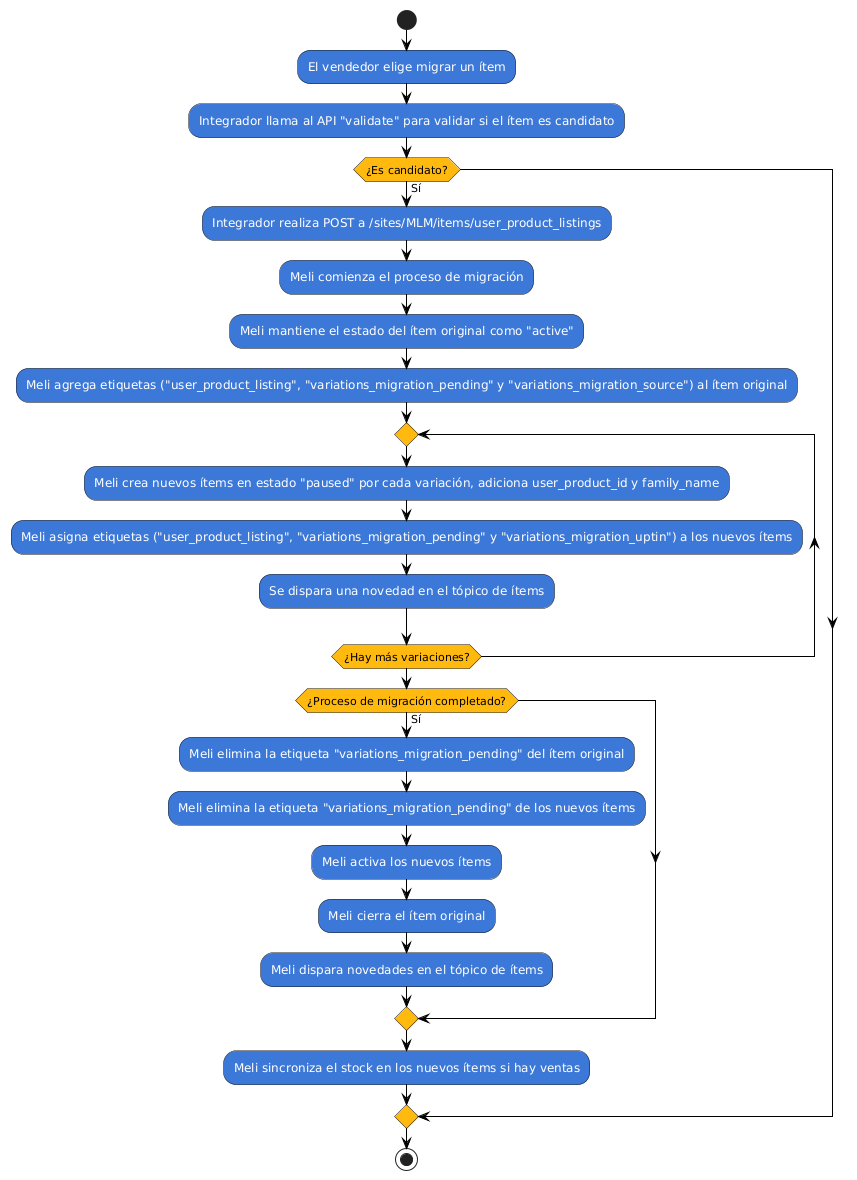
- When the UPtin process begins, the item with variations remains in "active" status.
- 2 migration tags are added: "variations_migration_pending" and "variations_migration_source".
- For each variation, a new item will be created with the variation's configuration.
- New items will have family_name to be grouped by family.
- Each new item is created with "paused" status and also 2 migration tags are added: "variations_migration_pending" and "variations_migration_uptin".
- For each item created, a notification will be triggered in the items topic.
- When the migration of all items is completed, then:
- The "variations_migration_pending" tag is removed from the old item, leaving only the "variations_migration_source" tag.
- The "variations_migration_pending" tag is removed from the newly created items, leaving only the "variations_migration_uptin" tag.
- New items are activated.
- The old item is closed (status=closed).
Tag details:
- variations_migration_source: the item with this tag was the origin of the upt-in process. It is an item with variations that will be closed at the end of the upt-in process, through which a new item is created for each variation.
- variations_migration_uptin: the item with this tag is the result of a upt-in process. It comes from an item with variations that went through the upt-in process.
- variations_migration_pending: added to both the original item and the new variation items while the assets of the original item are migrated to the new ones. This tag will be removed when the upt-in process finishes.
Next: Distributed Stock.